Friday, June 28, 2013

How to Drive More Dynamic Content into your Google Plus Stream - July 2013

Google offers many things in it's suite of products, one of the most under utilized products out there is Google's Drive. This tool allows you to build dynamic presentations that can link to live content. Most people post a single link or a photo to their stream and that's where it ends. However, within the framework of drive you can add pictures, links, video, anything. That way your post doesn't remain static and lost within a sea of other competing content.

Recently I posted a slide presentation to Google Plus and it got some very solid results. I feel that many people might either overlook drive, don't know much about it or just don't even know it exists at all. This post should help to guide you though an example which can help to drive a little more power to your G+ posts.


Drive offers a unique way to demonstrate how content can become more dynamic. It's a very easy tool to use and hopefully the next portion of the post will help clear up many of your potential questions. Below is a step by step guide to creating a post via drive and how to share it.

Where to Find Google Drive:

1) Go to www.Google.com and Click Drive

2) Click Create


3) Click Presentation
4) Choose a template (after clicking presentation, this is the next screen that pops up)

5) Select Layout
Select a template and it will open into a new presentation (I chose black for this example)
I went with a black background without anything else. I must now change the layout. Select layout and then content can be added.
From here it's a blank slate. You can choose to do a various array of things. What I will do is lead you through 2 examples of adding linked images & embedding a YouTube video. Besides that, I will show how to share this to the public, publish this to the web as well obrtain the embed code to embed this within your website.


 6) Adding a Linked Image to the Slide Presentation
Click on the image button as seen below:


 7) Add Image by Uploading or Selecting from any G+/Picasa Album

 8) After Adding Image You Must Click the Image and Make it Active
 A blue square will surround the image once active see below:
9) To Add an Active URL to the Picture, Click on the Link Button 


10) Click Image, If Link Appears at the Bottom the Image will Now Direct Traffic to the URL (Email or Slide)

You have now successfully linked your image to a url.

11) Click the Red Plus to Add New Slide for YouTube Video

 12) Click Insert and Select Video

 13) Paste the YouTube Link and Hit Select


14) After Adding Video, Add Change Title Text by Clicking On Text Box. Center Text by Hitting Alignment Button and Selecting Center


Now that we have a Video and a Photo both linked properly we are ready to share our Drive Presentation.

15) Click Share to Get Link & Change Access Rights 

 16) Hit Change to Adjust Levels for Public or Private Access

17) Select Audience You Want to Give Access & Select the Type of Access They are to be Granted


 18) Publish the Drive Presentation to the Web
  - If you want to get an Embed Code to Enable Embedding the Presentation on your Website you
  Must publish to the web. 

19) Use This Screen To get Access to Any Other Means of Sharing including the Embed Code

From here you now have both a slide with a linked image as well as a slide with a linked (and embedded) YouTube video. By publishing this presentation to the web you now have the ability to embed this into any webpage you want, even a blog like this.

By following these simple steps you can now create your own Drive Presentation to share with anyone, anytime. Below are 2 videos that take you through some of these in a little more detail.


Click either video to see how the presentation a created. One suggestion, open it through YouTube and click on large player, that will provide the best viewing results.

After watching the video and seeing how easy this really is, do you think it's worth driving more dynamic content into your stream? Do you think that we could all stand to benefit if more people started using drive to create posts? I would love to hear your thoughts so please comment below. Any questions, just ask.


Happy 2nd Birthday G+ Video


Monday Morning Drive Video


Composed by +Michael Bennett who works at Michlin Metals. A Woman Owned Small Business Aerospace Metal and Stainless Steel Distributor. Follow Michlin on Twitter @MichlinMetalsFacebookLinkedIn, Google+ or on the Web at www.michlinmetals.com. More on the author on Google+

Monday, June 24, 2013

Everything Google For Business

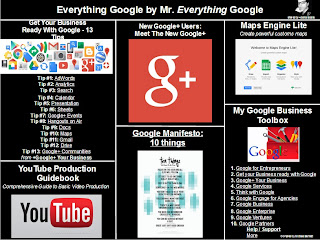
Everything Google by Mr. Everything Google

Here is a consolidated look at some of the most poignant and pertinent information about Google & Google for Business available. This content was originally provided and curated by none other than +Denis Labelle. There is content a plenty here folks, most images lead to pages and every link displayed is active, so just click away to dive deeper. From video production and Google Plus to Maps and Google Enterprise, these slides should have enough info for anyone to satisfy all their Google urges.


Composed by +Michael Bennett who works at Michlin Metals. A Woman Owned Small Business Aerospace Metal and Stainless Steel Distributor. Follow Michlin on Twitter @MichlinMetalsFacebookLinkedIn, Google+ or on the Web at www.michlinmetals.com. More on the author on Google+


Google For Business - Google Plus and Anything Google For Small Business
Image links to Google Drive Presentation Directly

Thursday, June 20, 2013

Video Content Creation for Small Business

SMALL BUSINESS VIDEO CONTENT CREATION
WITH TODD HARTELY CEO of WireBuzz

In this video Todd Hartley, CEO of WireBuzz discusses the importance of video content creation for business but especially for small businesses. It provides another means of being found in search and therefore can be very beneficial if adopted properly.  YouTube is currently the second largest search engine behind Google. Therefore it is a very good idea to begin creating this type of content. Watch this video to see how a small business might start using video content to reach new customers. 

Michlin Metals is a Woman Owned Small Business Aerospace Metal and Stainless Steel Distributor. Follow Michlin on Twitter @MichlinMetalsFacebookLinkedIn, Google+ or on the Web at www.michlinmetals.com. More on the author on Google+

Thursday, June 6, 2013

If Facebook is like High School, and Google Plus is like College, then Who Sits at the Cool Table?

I think it's safe to say that there is a new breed of popularity sweeping across the internet that can only be defined as an influentially pursuant, web based community of social medialites. Still with me? OK. If we can all recall, high school was a great time, where all the smart people were lauded and all the good looking people who were potentially less smart and possibly more athletic were less appreciated. We'd most likely be kidding ourselves, we all know the opposite to be true. If you were good looking, good at sports, had a decent personality you might have been popular in High School. What if anything resulted from that popularity? I am going to say that not many good looking athletes leveraged those strengths into anything formidable, or if they did, they were 1 out of 10,000, maybe. If not, they faded into the crowd w/age and became just another adult who now wishes they could relive their glory days.

Being a late bloomer I never reached my pinnacle or my glory days in High School (and frankly I'm still climbing). I always kept moving forward and knew that it wasn't the end of the world to not be the coolest kid w/the best hair or the best athlete. I had friends, I played tennis, I started my own business...I was balanced, and that was what was important to me. However, I am seeing a new breed of popularity developing and it has nothing to do with looks and all to do with brains and charisma. Yes, celebrities will always have millions of followers but there are a ton of people who are right on their tails in terms of influence and let me tell you something, they have WAY more to offer than some boy band member or hot model.

Google Plus is paving the way for a new breed of popularity and quite a bit of it relies on something that not many other networks give credence. Do you know what that is? Merit. How does Google judge what is good vs. what is bad? What is quality content vs. content that doesn't add value? Well, they rely on things like verified profiles and business pages, semantic search, authorship (in which case a pretty face can't hurt), social signals, consistency of publication and hundreds of other things included in their algorithm that produce the most relevant search results.

So, how does a person gain a higher level of influence (popularity to some)? Well, first things first, it's all based around quality. If you produce content, just for that very reason, to crank out quantity, chances are that no one will find it of any value and then what does your large amount of content net you? Nada. Whereas if you can produce 1 - 2 quality blog posts a week and get 50 reshares, 10 retweets and a couple link backs, you have just risen in the eyes of Google. Therefore you will be more visible to people via search and thus garner more clicks and positive attention. So, write one article at a time, produce quality, day in, day out and in due time you are close enough to the cool (smart) people that you can see what it is they do to sit at that cool people's table.

Who says that you need to throw a great spiral to be popular. Forget that, write a quality post and then one of those awesome people might share it for you. Thus giving a little of their popularity/influence over to you. (i.e. Link Juice) Now you are seen in the eyes of others as being connected to that cool person and they in turn, start to feel the same. They say, "man, if that guy shared his stuff it must be quality." Now +Mark Schaefer writes about this influence his his book Return on Influence and discusses this concept in way more detail but suffice to say that if you can tap into an influencer and they begin to share your material, others will most likely do the same. So how do you get to the point of either being an influencer (someone popular/smart/charismatic) or being close enough where an influencer shares your material?

It all begins with quality. No one wants to share garbage. They throw garbage away, they don't show it to other people, b/c it's trash. Write trash and trash will be your return on investment, write quality and expect that other people will find value in it. All of these people w/10's of thousands of followers on G+ didn't just get them over night (besides +Jesse Wojdylo, but he started w/11K last Tuesday (after 2 years) and now has 33K). Want to know why? I bet you can guess. It's got something to do w/quality. I mention Jesse often (bromance, I know, very funny!)  but him and I share many commonalities. However, this guy has been active on G+ since 2011 and posts 35 times daily, I on the other hand have only been active for a few months and can not match how prolific he is for many a reason. That doesn't however preclude me from producing quality when I have the time to write my posts. Jesse has done HOAs, written on his blog (sometimes more than 1 post daily, April he averaged 3 daily), posts to communities, helps out at a retirement community and just started his own YouTube show, The Wojdylo Show. Pronounced like armadillo except Wa-dillo. All these things are great, but if his heart wasn't in it, and they stunk, he wouldn't be on the Suggested User List accruing more followers daily than most of us have total again, all due to quality. So back to the cool people's table...In order to get a view into this realm, you have to first be let into the lunchroom. Remember, they don't let trash in the lunch room, they throw trash away.


I didn't know anyone on G+ 3 months ago. The relationships I' forming now, to me feel more important than any I have elsewhere (including IRL(in real life)). Great you have tons of FB friends, what value does it give you? 2000 Twitter followers, again, what value do they offer? Not that much. Do they ever even engage, or is it just numbers? Here on Google Plus the cool people's table is for creative people who have something to offer be it photography, SEO knowledge, small business expertise, great cooking and recipe info, you name it and there is most likely an entire community dedicated to the subject on G+ and you know who runs those communities? Cool people, smart people, creative people. People who care and want to add value b/c they are passionate about their love of food or their love of all things android. These are the thought leaders, these are the influencers, these are the people to emulate. These people have been honing their craft their whole life, and finally a social platform has given them the ability to express themselves and society as a whole can now benefit from their collective knowledge.

I have to say that without G+, I certainly wouldn't be blogging as much, which for me is now starting to act as a release, a connection w/something previously unfamiliar to me. It's that quickening feeling we get ( per +David Amerland) when we are involved in an amazing discussion or the feeling of exhilaration gotten from seeing what a good blog post does once published. Where else can a person who loves reading connect with authors? Where else can a person who loves photography connect with other amazing photographers from around the world? Where else can a person who loves technology do live hangouts via webcams and speak w/people all over the world? Google Plus, that's where. They have redefined the cool people's table, except here, all you need to do is produce quality consistently to get a seat.

Again, everyone is welcome to sit at the cool people's table here, providing you can gain admittance through earning it. It will be very apparent if you try to get in this club using a fake id. You will be spotted, labeled and returned to the place from where you came. Know why? Real recognizes real, and people can smell a fake anywhere. So be real, consistently produce quality, and create meaningful relationships through engaging within your selected communities. Only then, will you be admitted to the cool table for lunch, and let's face it...if that doesn't appeal to you, that's fine...there are plenty of social networks that will 100% followback and all you have to do to get big meaningless numbers is follow people...Good luck w/that. You can find me right here, looking at all the cool people and trying to make myself better everyday. Someday I might get to eat with those people and when I do, I will have earned it through hard work and dedication.

Michlin Metals is a Woman Owned Small Business Aerospace Metal and Stainless Steel Distributor. Follow Michlin on Twitter @MichlinMetalsFacebookLinkedIn, Google+ or on the Web at www.michlinmetals.com. More on the author on Google+

Friday, May 31, 2013

How 2 Peas Changed the Pod & the Pod is Google Plus.

There is an old saying that no man is an island onto himself. Well then, what are 2 men? Are they islands onto themselves? I think that the answer is no, they are not. The two men in question are +Jesse Wojdylo & +Paul Stickland. These 2 chaps have never been shy in terms of venting their frustration about their most favorite social platform Google Plus. Why should they? Google actually answers them. Isn't that strange? Out of 500 million users (200 Million or so active users) these 2 people actually get responses from Google when they voice their concerns. How does that actually happen, and why does it happen? Let's discuss.

First and foremost both Jesse and Paul have been active on G+ from very close to the onset of the actual platform. We don't need to argue over who has been on longer, but they both were active in 2011 and that will suffice for now. They both have around 16K followers (Jesse was just admitted into the Emerald City, aka the SUL (suggested user list) so by the time this post publishes he might be up to 20K (edit 5/31, he is up passed 20K) and I will hopefully be able to publish this today b/c if I don't it might be 25K at the rate he's currently going.). With that large of a base, they tend to get heard by some relatively influential people both inside of and outside of Google itself.

https://plus.google.com/u/0/photos/117245054937343378617/albums/5724700369791339089/5795088558100290434?pid=5795088558100290434&oid=117245054937343378617
Courtesy of Paul Stickland
Having screamed from the mountain tops my love for Google Plus for a little while now, this just reinforces my belief that we are on the cusp of something huge here. Where else can 2 singular people go, voice concerns about the social network that they are using, voice them on that very same network and actually GET A RESPONSE. No where. Imagine writing a tweet or a facebook post describing a problem and actually having twitter or facebook respond. A thought like this most likely has NEVER entered your mind. In fact the opposite holds so true that a thought like that seems irrelevant, so why even have it in the first place. It would just be upsetting. It's so much different on Google Plus though. I think I read somewhere that Google itself actually has 20K active G+ accounts from all their employees. Therefore it's not illogical to think that of those people, many are in circles w/you and me. Many watch what we watch on our streams and many are obviously active and there trying to help.

It's this notion of community that brings us all together here on Google Plus in the first place and the fact that Google's employees support us only reinforces the greatness that is Google Plus. Now both Paul and Jesse had different problems Wednesday 5/29.  They both connected w/each other through their own unique experiences Wednesday and were able to get some resolution to their problems. At 4:32 in the morning over here in the States (yesterday afternoon for Paul), he mentioned something to the extent that he was missing posts from people in his circles that he had set to more. Well setting a circle to "more" means every  post will be displayed by everyone in that circle. That was not happening.

Here are Pauls words: "OK, I have put all of you into one circle and unchecked 'Show posts in home stream' for all other circles. Google 'All' is totally different to my 'ALL'... So, in my new 'ALL', I scroll down to the first 'More' and I am already seeing yesterday lunchtime's posts and none of the posts that I know have been made by my top peeps..."

He certainly saw more posts but the posts he saw were from previous days and not matching up w/what should have been every post, from every person. He compared that circle to his others and found there was still a disparity between what was theoretically supposed to happen and display versus what was actually displayed. To the Google Phone Paul went and pinged +Natalie Villalobos. That ping was at 6:58am, by 11:11am she had responded that she was on the case and her team was aware. Granted a 'fix' to this problem can't just happen in an hour but where else can anyone get this type of service where you voice concerns in the early morning and by the late morning they are met with an answer? In terms of a social media platform, no where else, hands down. Here is the link to Paul's original post.

The second example also occurred Wednesday 5/29 at 3:31pm where Jesse posted this.
Google+, A 'Lil Help!

Is anyone else having issues with comments in the notification drop down box on desktop? I am not seeing an "expand comment" for those comments longer than a few lines. I have to go to the post to see them. Not easy!


Help! +Google+ Help 

So he pinged G+ Help right then at 3:31pm, but his problem, was also many other peoples problem which via G+ he immediately found to be the case. The comments weren't displaying the "read more" link and people (myself included) had to click on the view post just to see the comments. GASP! This went on for a little while longer and then at 4:44 this happened:

Andrea Zvinakis
Yesterday 4:44 PM
+
5
4
5
Hey +Jesse Wojdylo - this issue ('read more's not showing up in comments in the notifications panel) is a known regression for us that we've already fixed, so you should see the fix roll out shortly! Thanks for the report!

Problem Solved, less than 2 hours and it was right around this time where Paul who had also been a part of this thread  made a great suggestion.
Paul said: "Great news. It would be really helpful to have somewhere to go to  access status reports such as this"

So what have we seen thus far? 2 problems, both were addressed w/in 4 hours, 1 solved, the other being worked on, a new idea that could help create an even stronger Google Plus platform, 2 separate google employees engaging w/normal people (as normal as the 2 of them are), and actual service from the company steering the ship. I ask again, Where else can you find a platform like this? NO WHERE. 

I will leave you with this, Google Plus is a place that like-minded people can share information. The close knit circles that you travel in define your ability to make progress. Collect people like baseball cards and have bloated circles just for the numbers, you won't see much value. Circle real people that you connect and engage with and you will find real value is added not only to your stream but to your life and the lives of others. Both Jesse and Paul have been instrumental in my short lived time here on Google Plus but w/out them my experience would be far different and I certainly wouldn't be here now. Google Plus is what you make it and if you choose to make it a great place than that will be returned to you in spades. Be active, engage, comment, post, make friends, share and discuss. That's what makes Google Plus great, oh and they fix their problems in hours which kinda makes them the only kid on the block with the ball. If you want to play better get on board.


Michlin Metals is a Woman Owned Small BusinessAerospace Metal and Stainless Steel Distributor. Follow Michlin on Twitter @MichlinMetalsFacebookLinkedIn, Google+ or on the Web at www.michlinmetals.com. More on the author on Google+

Wednesday, May 29, 2013

Autoawesome Breakdown: How to Make Use of the New Autoawesome Motion Feature - May 2013

As of Wednesday 5/15 at Google's Annual I/O, they unleashed a barrage of updates. For a complete list of amazing updates check +Denis Labelle's post. In this post we will discuss a facet of a new feature on Google Plus, AutoAwesome 'motion'. There are some subsets (HDR/Panorama) of the autoawesome category but for now I am only going to focus on the motion portion of this feature.

First, let's discuss a little about what I know and what I don't regarding the motion aspect of autoawesome. This will give you a clear view of what's to come and how I have arrived at the following conclusions:

What I know:
Autoawesome motion works on the following frames with:

  • The same background: a static background that doesn't move (or moves ever so slightly)
  • A closely shot background shifting by small amounts (up/down, left/right) wherein keeping the bulk    of the frame static and consistent.
  • A constant similar shape remains the same yet gets smaller (or perhaps larger) as the frames zoom in/out 

What I don't know:

  • The maximum amount of frames an autoawesome image can be
  • Why certain frame sequences create motion images vs. panoramas
  • Why some (mostly manual upload) images can sometimes take countless hours (in some cases up to 36 hours) to compile, where as the instant uploads can be stitched together in seconds be comparison

Now that we have a basis for this post I can explain why I might be a good candidate to write it. I'm a guy who has loved taking pictures his whole life, time lapse and Panorama shots have always been some of my favorites, except I have done them the old fashion way. I take a zillion shots and then manual parse them together. I literally have several shots hanging in my house taken in Jackson Hole in 1994 that I took w/a point and shoot camera. I developed the film, cut the pictures, taped them together, framed them and hung them up on my walls.

What makes this whole thing much easier now is this feature they call autoawesome. In addition to that I have just discovered that the piece of technology (My Samsung Galaxy S3) I've been using as a smartphone has the ability to drop some seriously quality shots on people. This smartphone helps deliver more portability and convenience to photography b/c that can literally be your only piece of equipment, if you so choose.  If you do so choose, please make sure to turn on the "auto back-up" (aka instant upload) under your settings on your phone, so that as you take each shot, it automatically uploads your shots into your photos on G+, and don't worry they aren't auto-shared. It's a great way to shoot a bunch of different things and see what works. More info found here.

So, I thought it might be of some use to those looking to get a better handle on autoawesome if I wrote a little something on how this supposedly happens. Let me start with a disclaimer, I am merely a guy trying to make this work but before we proceed, let's define what an autoawesome "Motion" image is (as per google here) "If you've taken a series of photos in succession (at least 5), Auto Awesome will stitch these photos together into a repeating short animation." Ok, sounds easy enough. Let's get started.

So, I have 135 autoawesome images, that means that I have at least 675 images to make those 135 motion pictures. Another item to note is that it's a minimum of 5 images needed to stitch an autoawesome image together, that means I have MORE than 675 images b/c I have many w/more than 5 frames per image. Great, I have pictures. Yay for me, but that's not where I am going. I am setting the stage here people, describing what I know, and that, which I do not. Moving right along...Saturday 5/25 I took my son downtown and shot 417 pictures. Sounds like a ton doesn't it? He sure thought it was a TON and wasn't happy that I was not paying 100% attention to him but that's life in the big city. Be that as it may, of those images 400+ images, not 1 turned into a panoramic, and only a handful turned into motion shots (some taken this weekend didn't get autoawesome'd till 36 hours later). Again, this is not an exact science, it's a process in refinement.

Now onto the actual ways of getting an autoawesome image. First, frame setup. This is very important when trying to capture motion in your image. For anyone who doesn't normally take pictures, the concept of a grid in the viewfinder might sound new. Hang on, are there still viewfinders? On some of the Digital Single Lens Reflex cameras there are but let's replace viewfinder w/screen. Pretend your screen is a tic tac toe board.


Using this method it's best to keep all background images w/in this grid the same. If you see a tree in the top right block of the grid, keep it there for every one of the shots you expect to make this image. Minimal variation is suggested in between shots and a tripod would best ensure optimal results. However, back when I took slide film shots carrying a tripod wasn't fun and that was to shoot film. Not shooting film and most people being averse to lugging around all kinds of photo gear, people will mostly shoot w/their phones or small digital cameras. In this case, there should be an option to turn the grid on. If you need digital reminders of what appears where, in each frame as you shoot, you should turn on this feature. So step 1 is to turn auto back-up on via your phone's G+ app settings. Step 2 is to acquire the background however you see fit but make sure it's consistent throughout the series.

Ok, now we have the images uploading to your Google Drive (G+ we'll say) and the background is set. Well what do we want to capture in the foreground? We'll call that step 3. So set up the composition of the frame, which means determine your subject matter and frame it out by looking at the screen of your device. For this example we can use something basic where not much moves besides the a couple things slightly in the shot. We can use this shot of a willow tree blowing in the wind, behind a small pond which is also moving due to wind, clouds moving and lastly there is a highway behind it, so there are moving cars. The majority of the frame is static and remains still but it's only the branches on the tree are moving, the shimmering on the surface of the pond, the clouds moving and the cars driving on the road. Notice how all those things have verbs in front of them, moving branches, shimmering pond, moving clouds and driving cars. Take any of those out and it's just a picture of a willow tree and a couple cars in the background. I took 6 shots and this is the result. Again, it could have just been 1 thing moving but this one is slightly more dynamic and has several things moving.

So above are the 6 frames I used to get the autoawesome image below. You can see there is barely any difference in the frames. If bigger pictures were displayed you would see the different trucks in the background but might not notice much else. Yet the image below seems like there is just enough going on to not be too busy. I think that this is the name of the game here folks. Capture scenes that aren't over filled w/motion but are highlighted by motion that was never before able to be captured. It's not only about the motion, it's about the lack of motion as well. You need both stillness and motion to get the full autoawesome effect. That's the gist of it, but let's take another couple examples b/c I have seen quite a few different kinds of images posted and they all are different.


Quick Summary of Steps:
1) Turn on Auto-Backup (instant upload)
2) Frame the image and keep it consistent throughout the 5+ shots
3) Shoot at least 5 shots that will be auto-uploaded right to G+
4) Sit back, relax and wait for the magic to happen. (not so hard right?)


Let's discuss some random autoawesome images that have been magically stitched together by Google. Rhyme nor reason applies here so again, I will provide examples and discuss how they were shot.
Here are another two examples of the same background yet slightly different foreground images. I shot 75 pictures here in hopes of having a 75 frame autoawesome image count from 1- 50 and go from A - Z. I held the camera steady, put the post-its on a wall and shot the images. First is S-Z and 1-9. The second is 10 - 49. The easy thing to notice is that 1 has single character in the shots and the other has double characters in the shots. Well, that leaves a little to be desired as an explanation. Why didn't A-R show up and what happened to #50? Things again, I don't know, all I can do is show examples, practice, refine and speculate. Here they are:


Here are two other examples that I shot and thought would have been stitched as a panoramic shot. They did not, they autoawesome'd themselves into these types of motion pictures. My hypothesis as to WHY they would have been stitched like this is b/c the frames are actually TOO close together, therefore google thinks that it should be motion and not a long panorama shot. Shooting panoramas in the past, I would shoot a frame, turn, reframe the next portion of the image overlapping the frames only slightly so that there was enough of an overlay to parse the images together without a seam and shoot. Leaving myself w/3-4 frames that connect and create one long master image. Well below is what happened. Not panorama, motion Go Figure.


Here is yet another example by +Demian Farnworth where he captures a trailer park from a certain vantage point. First things first, this image didn't compile right away, it took numerous hours, so many that I assumed it wouldn't compile b/c each frame is too different. That being said, I believe that if you have a constant, Like Desmond does Faraday, as this image does the 2X2 window, than you should be able to capture an image like this. Notice the window is the center focal point of every frame (or at least it appears in every frame, maybe just getting larger each time) & after compilation, it produced this image. So the theme here is to have something that remains constant and either walk towards, or away from it while snapping a frame every few feet or so. The compiler is a computer, so something must remain constant so that it knows it's the same object in a different and separate image. Again, speculation, and I ask (& if you have any thoughts or an answer please share), what else could it be?

That seems to sum up most of the kinds of autoawesome images that there are. I know there might be more but we have covered a static, non moving background, a left/right up/down motion of snapped shots that move across a landscape/cityscape and a constant in the image as the photographer moves. Now I have an image where the foreground is clear and the background moves, see below. I know there has to be something that I am missing but I feel like this really covers most of the bases.

I have a few more parting words here that are on my mind about the potential for autoawesome to shake things up a bit. Similar to Vine w/out sound, these images can evoke a real emotional response from people. Knowing that emotion drives decision making behavior whether in business or personal. There might be ways to use this tool to create new means of content distribution perhaps advertising or some other application in business. To that point, I saw an image that was supposedly 50 frames long. The longest I have so far is 40 (it's the 10 - 49 above). Whatever the case may be, 12 frames per second gives the appearance of motion, so 50 frames is just over 4 seconds of motion picture. 22 more and you have the 6 second clip that vine touts, w/out the sound. That's just a little thing to think about. We can discuss further in the comments but this feature certainly has opened some new doors to things we haven't thought previously possible.

We have seen some examples of autoawesome at work, now it's your turn to start making some autoawesome images. If there are any questions that you might have, please feel free to comment below or  message me directly. If you are interested in autoawesome I would suggest joining the autoawesome community on G+ found here: autoawesome community. I have a ton more images to share and would love to see what you guys come up w/via this new autoawesome feature. So as we part ways today I wish you all the best of luck on your upcoming autoawesome endevours and happy snapping!

Michlin Metals is a Woman Owned Small Business Aerospace Metal and Stainless Steel Distributor. Follow Michlin on Twitter @MichlinMetalsFacebookLinkedIn, Google+ or on the Web at www.michlinmetals.com. More on the author on Google+

Friday, May 24, 2013

Inconel, Waspaloy, Hastelloy Oh My. What Makes High Temp Nickel Based Alloys Expensive & Why? May 2013

Let's start off by saying that the following types of High Temperature Nickel Based Alloys are all very pricey: Nickel 200, Inconel, Monel Hastelloy & Waspaloy. Now within those grades are subsets, for instance, contained in the Inconel Family are the following grades: Inconel 600, Inconel 625, Inconel 718, Inconel 800H/HT and Inconel 825. Monel has a couple of different grades, Monel 400, Monel R405 and Monel K500. Lastly in Hastelloy, there are Hastelloy C-276, Hastelloy X and Hastelloy C22. Ok, so that's that.

Now that we have dispensed w/the un-pleasantries we can discuss why all of these types of materials are expensive. First and foremost are their elemental compositions. All of these alloys contain Nickel which is very expensive when compared to the base price of other elements in the steel's composition. Standard grades of 300 series stainless steel might contain 8% - 14% Nickel. Standard High Temp Nickel Alloys contain anywhere from 40% - 75% and up...that is anywhere from 4X to 8x as much as typical 300 series stainless steel. We all know that nickel is an expensive material, but how much does the amount in a given steel impact the total overall cost?

Well the answer to that is relative, but as I discussed in an earlier blog post, nickel pricing is up to 66% of the total cost of stainless steel. Now, that is just for stainless which we know the 300 series contains 8% - 14% Nickel on average. Imagine the grades that contain 40%, all the way to 80% or even Nickel 200 which is almost pure Nickel at 99%. Obviously the more nickel content in a given alloy the more impact on price it will have. We can say for comparison sake that 316 round bar costs $3.00 per pound and contains 12% nickel.
Well, Inconel 625 round bar contains at least 72% Nickel. That's 6 times the amount and therefore it costs at least 6X as much, maybe more depending on other attributes but this is a fitting example as to the reason why there is such a large disparity between standard stainless steel cost and the cost of some of these nickel based alloys. In fact, Inconel 625 round bar DOES cost at least 6X more and that's buying mill quantities, forget a bar here or a couple bars there. The cost would trend upwards from there, again, based on quantity purchased, transportation, source of material...etc.

Another reason why these high temperature nickel based alloys are so expensive is based on their lack of availability, or supply. Not everyone carries them due to their inherently high cost and that means less overall availability which translates to a higher price. Now, the reason they are referred to as High Temp Alloys is because they have properties that allow them to withstand some exceptionally high temperatures in their given applications. Again, in order to withstand an application that maintains an average temperature of 2000 degrees, it requires the metal to be finished/treated a certain way. All that additional processing before the material even hits the shelf costs the mill (manufacturer) money to do, which again, more production costs equal more cost to the distributor thus more cost to the end user. These alloys are expensive, but they all have their very specific uses which we will be discussing in the upcoming posts. Hopefully this has shed a little light on the overall cost structure of these high temp nickel alloys and was a beneficial read.

Michlin Metals is a Woman Owned Small Business Aerospace Metal and Stainless Steel Distributor. Follow Michlin on Twitter @MichlinMetalsFacebookLinkedIn, Google+ or on the Web at www.michlinmetals.com. More on the author on Google+